Build a B2B checkout
Create a session linked to a buyer, have Ormuz execute the payment or credit journey, then confirm the order only when checkout, the financial decision, and the required checks are favorable, including fraud checks or any other internal, external, or partner validation.
Business objective
A checkout_session represents one checkout attempt for a company and a buyer contact. It carries the cart, amounts, addresses, return URL, and the process that decides how the buyer may pay for the order.
Checkout can start in an online journey, for example from an e-commerce site or B2B portal, but also in-store or from an assisted point of sale. In every case, the session has the same role: contextualize the buyer and transaction, run the required checks, and produce a decision that the system carrying the order can use.
The journey may result in immediate payment, an authorization, or deferred credit. Your system retains control of the order and fulfillment; Ormuz supplies the result needed to make that decision.
The session answers “is checkout complete?” and “was payment or credit accepted?”. The order remains the object that answers “may we fulfill, and has fulfillment happened?”.
Prerequisites
| Element | Why it is required |
|---|---|
| Merchant | Defines the checkout scope and configuration. |
company | Represents the B2B buyer to whom the financial decision applies. |
contact | Identifies the person accessing the User Journey and acting for the company. |
| Checkout process launcher | Associates new sessions with a checkout process definition. Several launchers may coexist for the merchant. |
return_url | Returns the buyer to your application after a redirect defined by the journey. |
The company and contact must belong to the same merchant, and the contact must be attached to that company. When several checkout launchers are active, explicitly provide the process_definition_id to use when creating the session.
Target journey
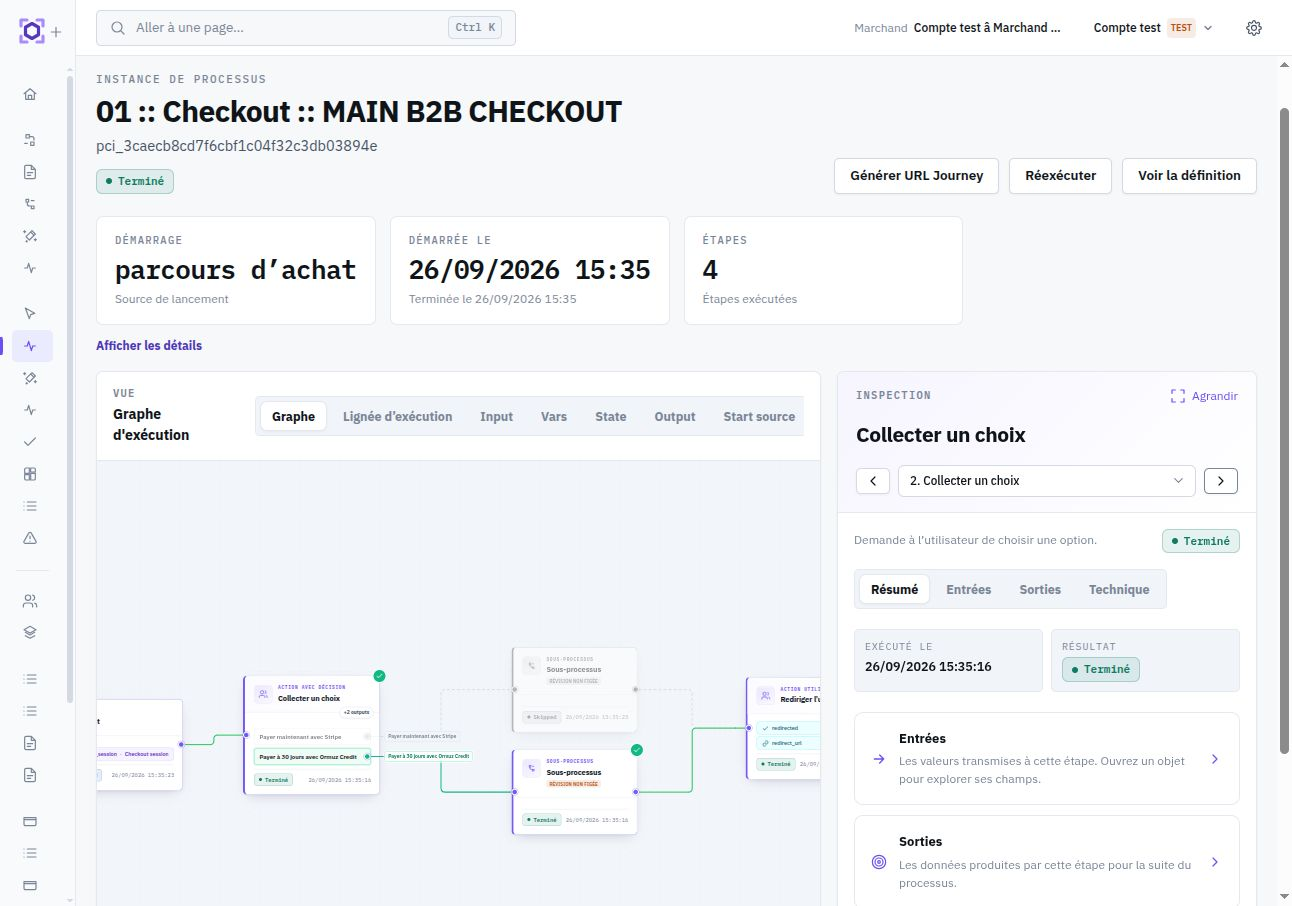
The checkout process chooses the financial branch, produces an explicit decision, then finalizes the session.
Create the session
Your backend sends the buyer, contact, cart, amounts, and optional return URL.
Redirect to the User Journey when needed
If the process waits for a user action, open the contextualized URL returned with the session. Otherwise, let the process run without a redirect and wait for the checkout-completion webhook.
Choose the settlement method
The process may collect a payment, request an authorization, or evaluate credit capacity.
Finalize and synchronize the order
The process sets both statuses; your system rereads the session or handles its completion event.
Create the session
Call POST /v1/checkout/sessions from your backend. All three amounts are required, expressed in the currency's minor unit, and must satisfy amount_excluding_tax + amount_tax = amount_including_tax. The request does not choose payment versus credit: the checkout process carries that decision and executes the required capabilities.
POST /v1/checkout/sessions
Content-Type: application/json

{
  "merchant_id": "mer_abc123",
  "buyer_id": "cmp_abc123",
  "buyer_contact_id": "ctc_abc123",
  "currency": "eur",
  "amount_excluding_tax": 10000,
  "amount_tax": 2000,
  "amount_including_tax": 12000,
  "return_url": "https://shop.example/orders/ORD-2026-104",
  "source_reference": "ORD-2026-104",
  "line_items": [
    {
      "line_type": "service",
      "product_name": "Annual licence",
      "quantity": 1,
      "unit_amount_excluding_tax": 10000,
      "unit_amount_including_tax": 12000,
      "currency": "eur"
    }
  ]
}{
"id": "cs_abc123",
"object": "checkout_session",
"status": "open",
"payment_status": "unpaid",
"merchant_id": "mer_abc123",
"buyer_id": "cmp_abc123",
"buyer_contact_id": "ctc_abc123",
"process_instance_id": "pci_abc123",
"source_reference": "ORD-2026-104",
"currency": "eur",
"amount_including_tax": 12000,
"url": "https://hosted.example/access/..."
}The line_items describe the cart at creation time. They may represent a product, service, shipping, discount, or fees. They cannot be modified after session creation.
Keep the returned cs_* ID. source_reference lets you find the session from your order number, but it does not by itself replace a deduplication strategy at creation.
Carry the financial decision in the process
The process receives the checkout_session as an input object. It can read its lines, amount, company, and contact without asking the designer to map technical identifiers.
| Branch | Typical capabilities | Expected result |
|---|---|---|
| Immediate payment | Create or reuse a PSP payment, collect or authorize funds | paid or authorized |
| Deferred credit | Evaluate available capacity, apply risk rules, grant credit | credit_granted |
| Decline | Provider decline, insufficient capacity, or an unfavorable business rule | failed |
The finalize_checkout_session node updates the financial result and lifecycle together. This explicit finalization avoids treating mere completion of User Journey screens as proof of payment.
Separate journey and financial outcome
The two status axes answer different questions. status describes the journey; payment_status describes the financial outcome.
status | Meaning |
|---|---|
open | The session is accessible and can still be completed. |
completed | The journey completed successfully. |
expired | The session passed its validity period. |
cancelled | The session was explicitly canceled. |
payment_status | Meaning |
|---|---|
unpaid | No payment or credit has yet been accepted. |
paid | An immediate payment was collected. |
authorized | The payment is authorized, subject to your capture policy. |
credit_granted | Deferred payment was accepted. |
failed | The payment attempt or credit decision failed. |
cancelled | The financial attempt was canceled. |
An order is ready to be confirmed when status = completed and payment_status is paid, authorized, or credit_granted.
A completed + unpaid session does not authorize delivery. Conversely, credit_granted indicates a favorable decision without imposing the provider or mechanism carrying the risk.
Events and tracking
| Event | Use |
|---|---|
checkout_session.created | Trace creation and opening of the journey. |
checkout_session.completed | Reread both statuses and decide whether to confirm the order. |
checkout_session.expired | Close or renew an attempt that became inaccessible. |
checkout_session.abandoned | Trigger a reminder or abandonment analysis while the session remains open. |
A User Journey is required only when the process contains user actions. A fully automated checkout can remain server-side: your integration then waits for the checkout_session.completed webhook and rereads the session before updating the order.
After a success redirect, also reread the session server-side. The redirect improves the user experience; the API and events carry the business result to use for your order.
An open session expires after 24 hours by default when you do not provide expires_at. You can also explicitly expire an open session with POST /v1/checkout/sessions/:id/expire.
Integration checklist
- Create or resolve the buyer company and contact before checkout.
- Configure at least one active checkout launcher and explicitly select the
process_definition_idwhen several exist. - Send consistent amounts and lines in one currency.
- Store the session ID with the source order.
- Redirect to the User Journey URL returned by Ormuz only when the process waits for a user action.
- For an automated journey, wait for the checkout-completion webhook without requiring a redirect.
- Explicitly finalize
statusandpayment_statusin the process. - Confirm the order with the two-axis rule, never with
statusalone. - Handle webhooks idempotently and reread the session before fulfillment.
- Plan for decline, cancellation, expiration, and abandonment cases.