Expressions
Expression mode uses JSONata to calculate a value at runtime when a direct binding or fixed value is insufficient. It preserves the process type system and data-protection rules.
Expression editor
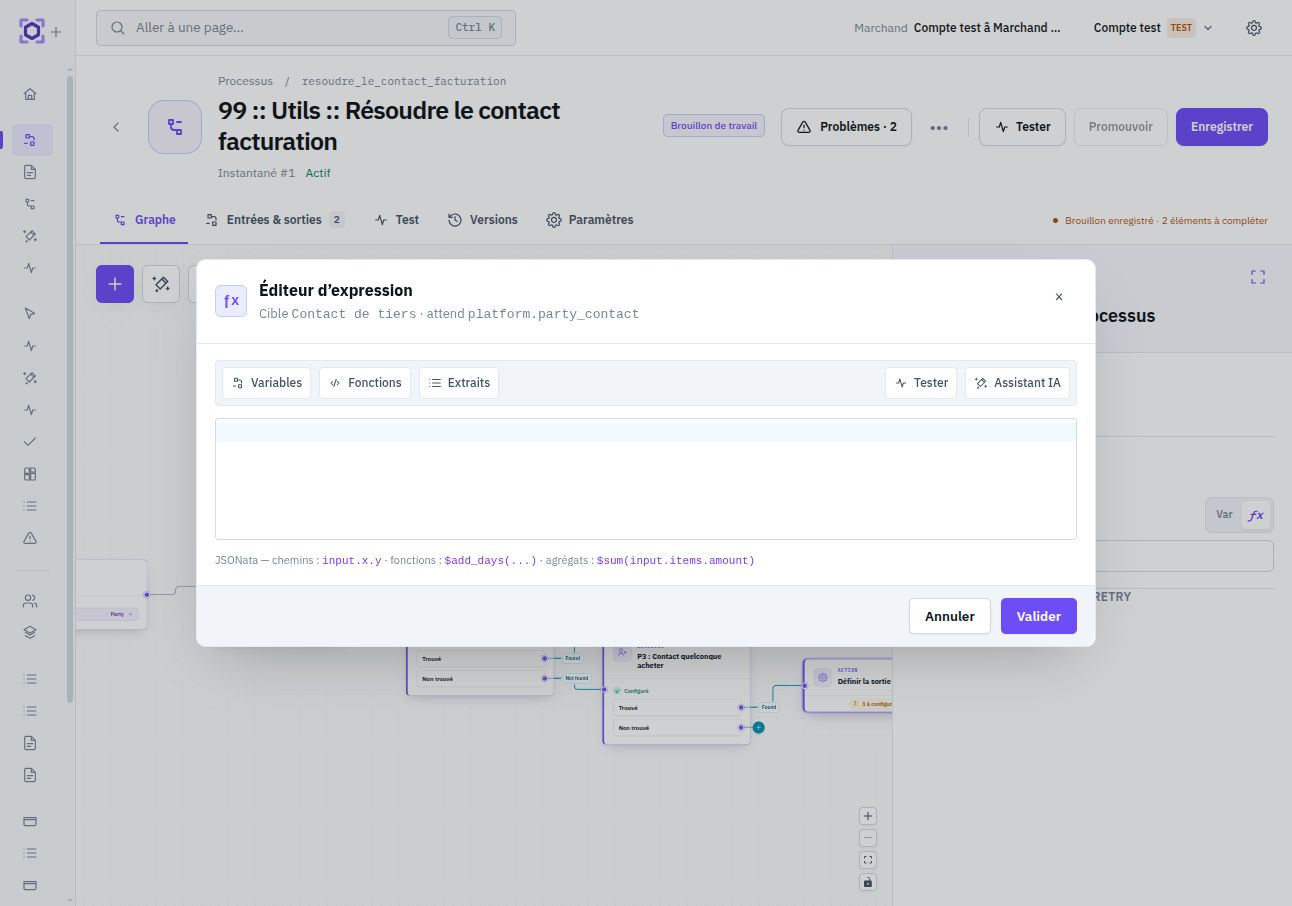
Expressions are edited in a dedicated modal. The parameter value is changed only when clicking Valider ; closing or canceling the modal preserves the previous expression. This transactional editing lets you explore and test an expression without progressively modifying the process.
The toolbar groups design aids: variable browser, function browser, ready-to-adapt snippets, and test panel. Suggestions are filtered according to the current node context and expected type.
Available context
An expression can read the same sources as bindings: input for process input, nodes.<node_id> for guaranteed outputs of a previous node, vars for process variables, and env for merchant environment variables.
Virtual relationships exposed by platform objects can be traversed like other properties when their availability is guaranteed. The editor uses their real type for autocomplete and validation.
Guaranteed-ancestor rules still apply: an expression does not turn a potentially absent output into a safe dependency. For typing and available sources, see Inputs, outputs, and bindings.
Expected type and inferred type
The editor header displays the type expected by the parameter. During editing, Ormuz also infers the expression result type and flags incompatibilities before validation. The goal is to verify not only that the expression is syntactically valid, but that it produces a value usable by the node.
When Each is enabled, the expected type is transformed to reflect source cardinality: a node expecting T can thus receive a collection T[] and be executed once per element. See Collections and loops.
Fonctions Ormuz
This table is derived from the safe-function catalog available in the expression runtime, so it remains aligned with Ormuz functions actually exposed.
| Fonction | Description and example |
|---|---|
$add_days(date, n) | Adds a number of days to a date or datetime. $add_days(input.invoice.due_date, 7) |
$add_hours(datetime, n) | Adds a number of hours and returns an ISO 8601 datetime. $add_hours(input.checkout.created_at, 2) |
$add_minutes(datetime, n) | Adds a number of minutes and returns an ISO 8601 datetime. $add_minutes(input.checkout.created_at, 30) |
$add_months(date, n) | Adds months while respecting month ends. $add_months(input.credit_limit.valid_from, 12) |
$cents_to_amount(units, decimals?) | Converts an integer in minor units to a decimal representation. $cents_to_amount(input.invoice.amount_including_tax) |
$coalesce(...values) | Returns the first argument that is not null or undefined. $coalesce(input.invoice.reference, "UNREFERENCED") |
$diff_days(from, to) | Calculates the number of days between two dates. $diff_days(input.invoice.due_date, $now()) |
$end_of_day(date) | Returns the end of the day in UTC. $end_of_day(input.invoice.due_date) |
$format(value, format, options?) | Formats a value using public Ormuz formats. $format(input.invoice.amount_including_tax, "amount", { "currency": "EUR" }) |
$if_empty(value, fallback) | Returns a fallback value when the value is missing or empty. $if_empty(input.buyer.trade_name, input.buyer.legal_name) |
$markdown_table(rows, columns, options?) | Turns a collection into a Markdown table. $markdown_table(input.line_items, [{"label":"Article","path":"product_name"}]) |
$start_of_day(date) | Returns the start of the day in UTC. $start_of_day(input.invoice.due_date) |
$subtract_days(date, n) | Subtracts a number of days from a date or datetime. $subtract_days(input.invoice.due_date, 30) |
$subtract_hours(datetime, n) | Subtracts a number of hours and returns an ISO 8601 datetime. $subtract_hours(input.checkout.expires_at, 2) |
$subtract_minutes(datetime, n) | Subtracts a number of minutes and returns an ISO 8601 datetime. $subtract_minutes(input.checkout.expires_at, 15) |
$subtract_months(date, n) | Subtracts months while respecting month ends. $subtract_months(input.invoice.due_date, 3) |
$to_date(datetime) | Extracts the YYYY-MM-DD date from a datetime. $to_date(input.invoice.issue_date) |
$today() | Returns the current UTC date as YYYY-MM-DD. $today() |
Test an expression
The test panel evaluates the expression with preview context available in the editor. It shows the result and type to quickly verify a transformation before validation. This test remains a design aid: actual execution uses instance data and snapshots.
Examples
/* Due date + 30 days */
$add_days(input.invoice.due_date, 30)

/* First available amount */
$coalesce(input.invoice.amount_including_tax, input.order.amount_including_tax)

/* Sum a collection */
$sum(input.line_items.amount_including_tax)

/* Validity end date */
$add_months(input.credit_limit.valid_from, 12)
When to use an expression
Use an expression for a calculation, relative date, transformation, or composition of several values. For filtering, sorting, partitioning, or iterating over a typed collection, prefer dedicated nodes: they preserve item type explicitly and keep process intent readable.
Likewise, for an ordinary routing decision, prefer routing and decision nodes rather than an opaque expression when the need can be expressed directly.